How To View The Cycle Calendar
Abstract
ERPNext has several different types of Cycle Calendar views.
- List View
- Calendar View
- Report View
- Gantt View
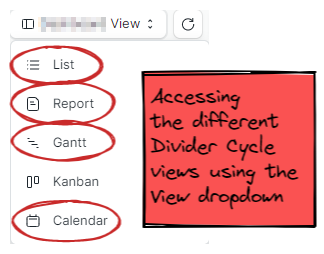
All of the different views can be accessed using the view menu from the Dividers Cycle DocType.
Accessing the View Menu
List View
This is the default view. You can filter by cycle and cycle type to quickly find the cycle you are looking for. View the List View by selecting it from the view dropdown.

Calendar View
In the calendar view, the different cycle types are color coded for easy discoverability. View the Calendar View by selecting it from the view dropdown.

Report View
This view is based on the calendar view from the legacy system the ERPNext replaces. View the Report View by selecting "Report View from the view dropdown, then selecting "Cycle Calendar" report on the left.

Gantt View
This view shows a little bit too much by default, but filtering by cycle might make it useful for broad overviews.
