How To Create a Continuation Commissions Breakdown
Info
For more information on the meaning of each field, see the Continuation Commissions Breakdown reference.
Note
Commission Structure selection is determined by the Contract Comissions Breakdown the Continuation Commissions Breakdown Document is based on.
Instructions
Tip
Keep track of your place below by clicking on the gray checkmarks.
- Start a new Continuation Commissions Breakdown Document.
- Fill out the form as described below, ignoring any sections or fields that are not listed.
- Click the blue "Save" button in the upper-right corner above the form.
Continuation Commissions Breakdown Form
Top Section
- Contract Commissions Breakdown
- Select the Contract Commissions Breakdown Document that defines commissions for the Contract you wish to break down continuation commissions for.
- Program Schedule Cycle
- (optional) Identify which Program Schedule to break down commissions for by selecting a Program Schedule Cycle from the Dividers Contract. Selecting a Program Schedule Cycle will automatically select the associated Program Schedule Date (below).
- Program Schedule Date
- Identify which Program Schedule to break down commissions for by selecting a Program Schedule Date from the Dividers Contract.

Top Section 2
- Comments
- (optional) Enter any notes related to this Continuation Commissions Breakdown Document.

Commission Structures Section
Note
The Sales Person and Sales Roles in this list are taken from the Contract Commissions Document and cannot be changed.
- Commission Structures
-
For each Sales Person or ISO, select:
- Commission Structure
- The appropriate Commission Structure is automatically selected. You can change the Commission Structure here if needed - for example, to view what the commission amount would be using a different set of rules.

Commission Adjustment Section
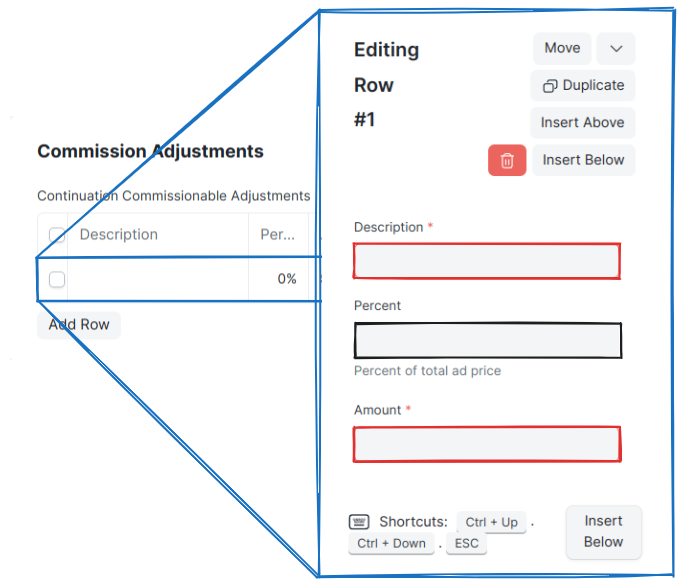
- Contract Commission Adjustments
-
Enter amounts to add or subtract from the Commissionable Amount.
- Description
- Enter a short description for the adjustment.
- Percent
- (optional) Enter the percentage of the Continuation Rate you wish to adjust the commissionable amount by. Use a positive value to add, and a negative value to subtract. Entering a percent will automatically calculate the Amount (below).
- Amount
- (optional, required field) The absolute value that will be added or subtracted from the commissionable amount. Use a positive value to add, and a negative value to subtract.
Commission Rules Section
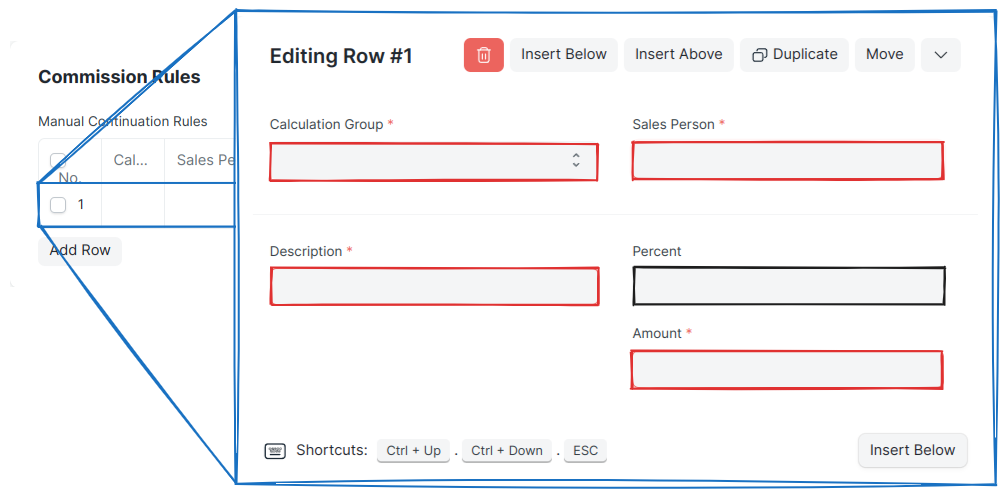
- Manual Contract Rules
-
Enter manual commission rules and adjustments specific to this continuation schedule that are not defined in the Commission Structure Document(s).
- Calculation Group
-
Enter the calculation group this rule will be applied in.
- "Standard": Values in this group are added and subtracted before others.
- "Com limit": Values in this group are applied as commission limits.
- "Post limit": Values in this group are added and subtracted after the commission limits are applied.
- Sales Person
- The Sales Person this rule applies to.
- Description
- Enter a short description for this rule.
Note
Required when "Com limit" is selected as the Calculation Group. In this case the value of this field indicates the maximum possible commission percentage, and Amount field is ignored.
- Percent
- (optional) The percent to use to calculate the amount to add or subtract from the total commission. Entering a percent will automatically calculate the Amount (below).
- Amount
- The commission amount to add or subtract from the total commission. Ignored when Calculation Group is set to "Com limit".
Lifecycle
Adjusting Continuation Commissions Breakdown
Warning
Before adjusting any Continuation Commission Breakdown Document, make sure any relevant changes to the following Documents are in place:
- Dividers Contract
- Contract Commissions Breakdown
Info
Continuation Commission Breakdown Documents are adjusted the same way any submitted DocTypes are. First cancel the existing Document, then Amend it, making any relevant adjustments.